Choosing the right Zoho CRM involves more than just comparing Zoho CRM and monthly subscription costs. The edition you choose impacts automation, reporting, scalability, and long-term ROI.
Many businesses evaluating Zoho CRM plans either outgrow their plan too quickly or end up paying for features they don't need. At CRMOZ, one of the most common questions we hear is: "Which Zoho CRM is right for us?"
In this guide, we'll compare Zoho CRM , explain the differences between Zoho CRM , review the actual CRM Zoho CRM for teams of various sizes, and help you choose the best option based on your business needs and growth goals.
Zoho CRM Overview
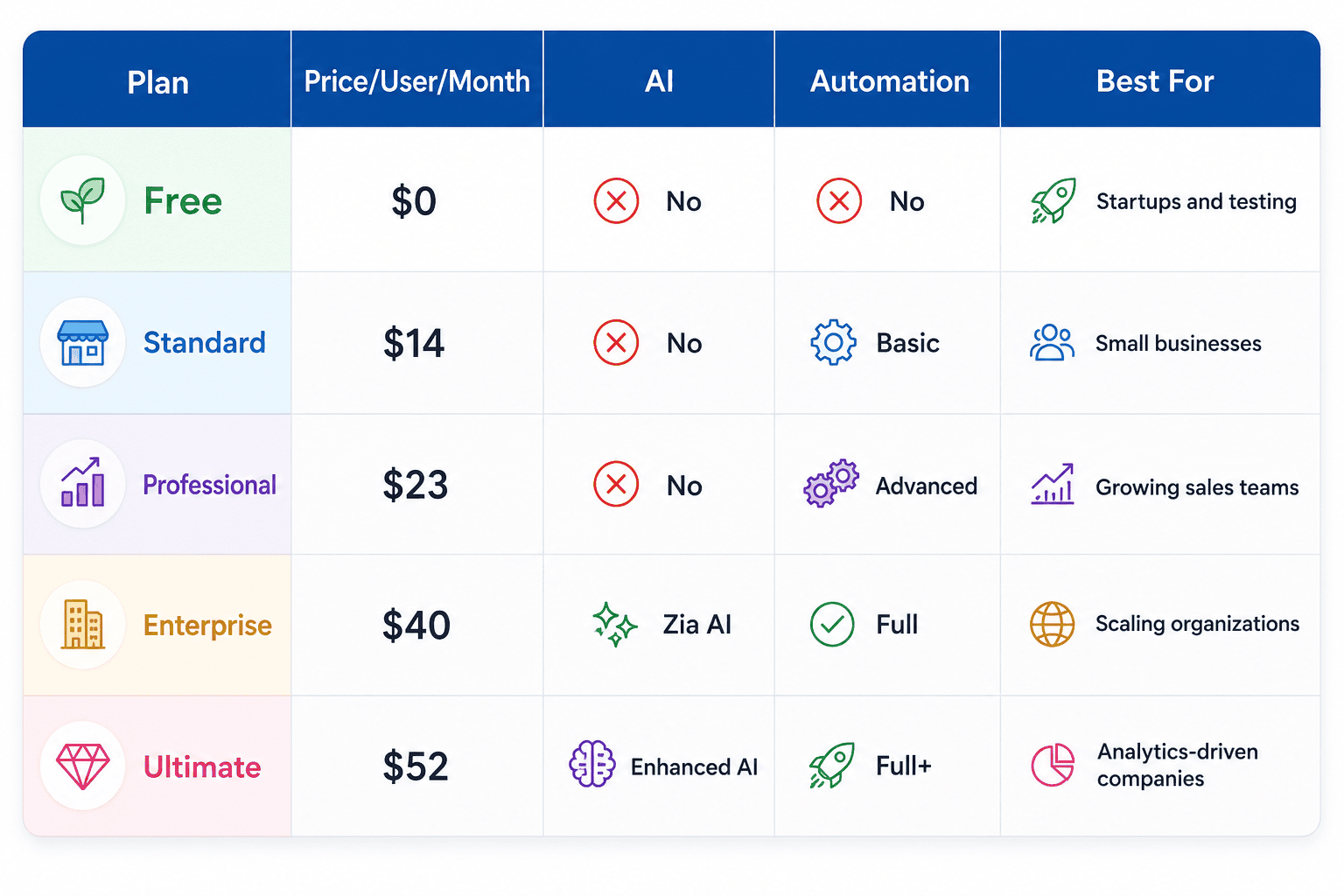
Which Zoho CRM Do We Recommend?
Based on our experience implementing Zoho CRM hundreds of U.S. businesses, here are our straightforward recommendations tailored to each company’s stage.
Startups (1–3 Users, Early Stage)
Start with the Free plan to test your sales process and CRM . Upgrade to Standard as soon as you hire a second salesperson or need email tracking and custom fields.
Small Businesses (5–15 Users, Established Process)
Professional is almost always the right place to start. The blueprint and workflow automation features make the price difference from Standard well worth it for any team with a repeatable sales process. If you’re already selling products, Professional is a must-have.
Growing Companies (15–50 Users, Scaling Sales)
Enterprise. Period. Zia AI, custom modules, territory management, and the sandbox are not optional extras at this stage—they are operational essentials for a growing sales organization. The ROI the Enterprise plan over the Professional plan typically pays for itself within one to two quarters for teams of this size.
Mid-Market Organizations (50+ Users, Complex Operations)
Enterprise is ideal for most teams, while Ultimate is best suited for organizations where executive analytics, BI reporting, or high-volume integrations are strategic priorities. We recommend consulting with CRMOZ a detailed needs assessment before committing to Ultimate, as Zoho One offer better overall value depending on your broader software stack.
Zoho CRM Compared
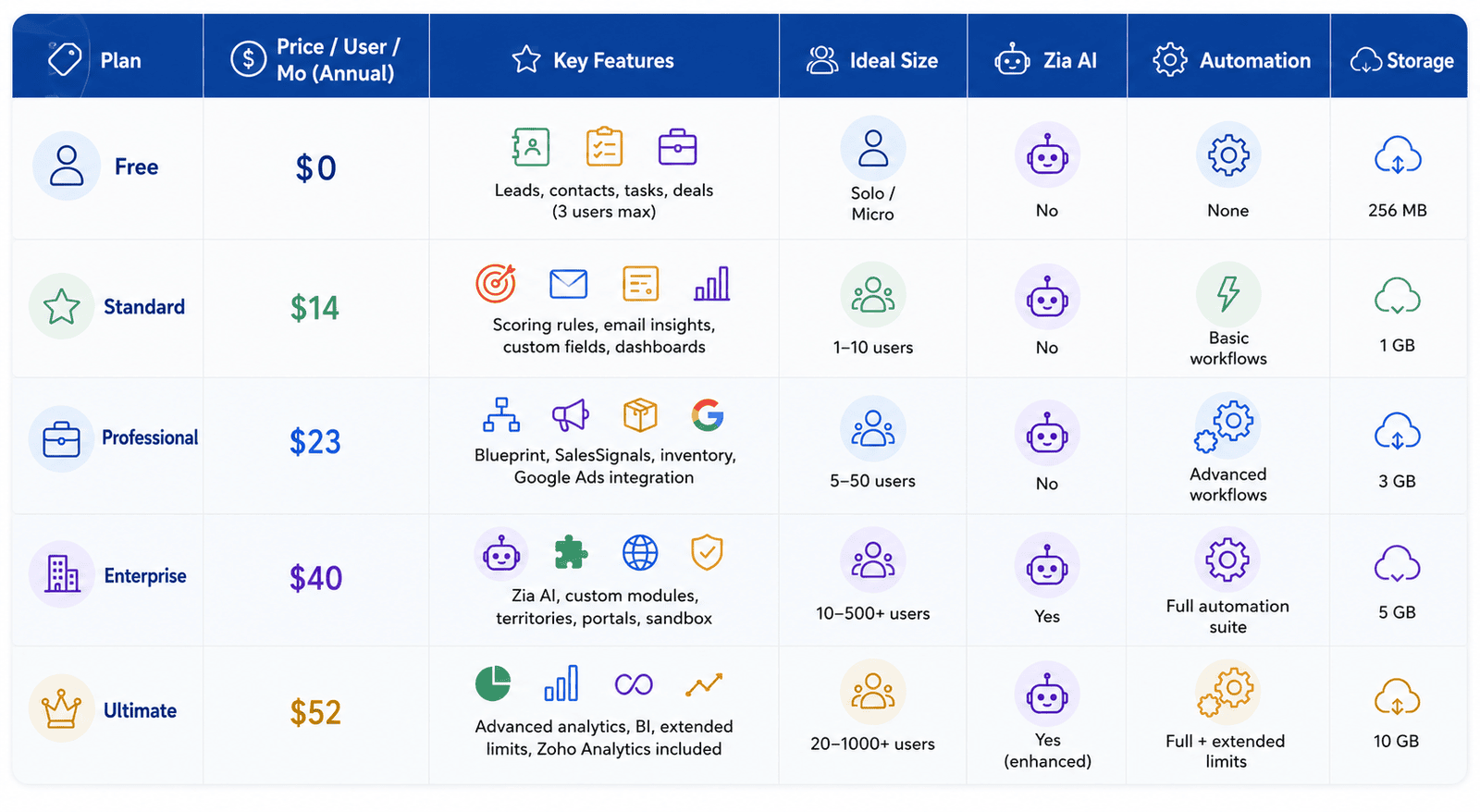
Need help choosing the right Zoho CRM ?
Zoho CRM Plan: What It Offers — and Where It Falls Short
What the Free Plan Includes
The Zoho CRM plan supports up to three users and provides the core features of a CRM: leads, contacts, accounts, deals, tasks, and basic activity tracking. You can log calls, send emails directly from the platform, and track deals through a basic pipeline. It serves as a functional starting point for a solo founder or a very small business that simply needs a place to store contact information.
When to Upgrade
Upgrade as soon as you hire your second salesperson, want to automateups, or need to report on pipeline performance to stakeholders. Staying on the Free plan beyond this point will cost you more in lost productivity than the subscription fee ever would.
Best Use Cases for Standard
The Standard plan is ideal for teams of 1–10 people who have outgrown spreadsheets and want a full-fledged CRM don’t yet have complex workflows or multiple sales channels. A small B2B firm tracking 50–200 active prospects would be a good fit. If your team is growing or your sales process has more than three or four stages with specific rules at each step, you’ll want to consider the Professional plan.
Zoho CRM Plan: Where True Automation Begins
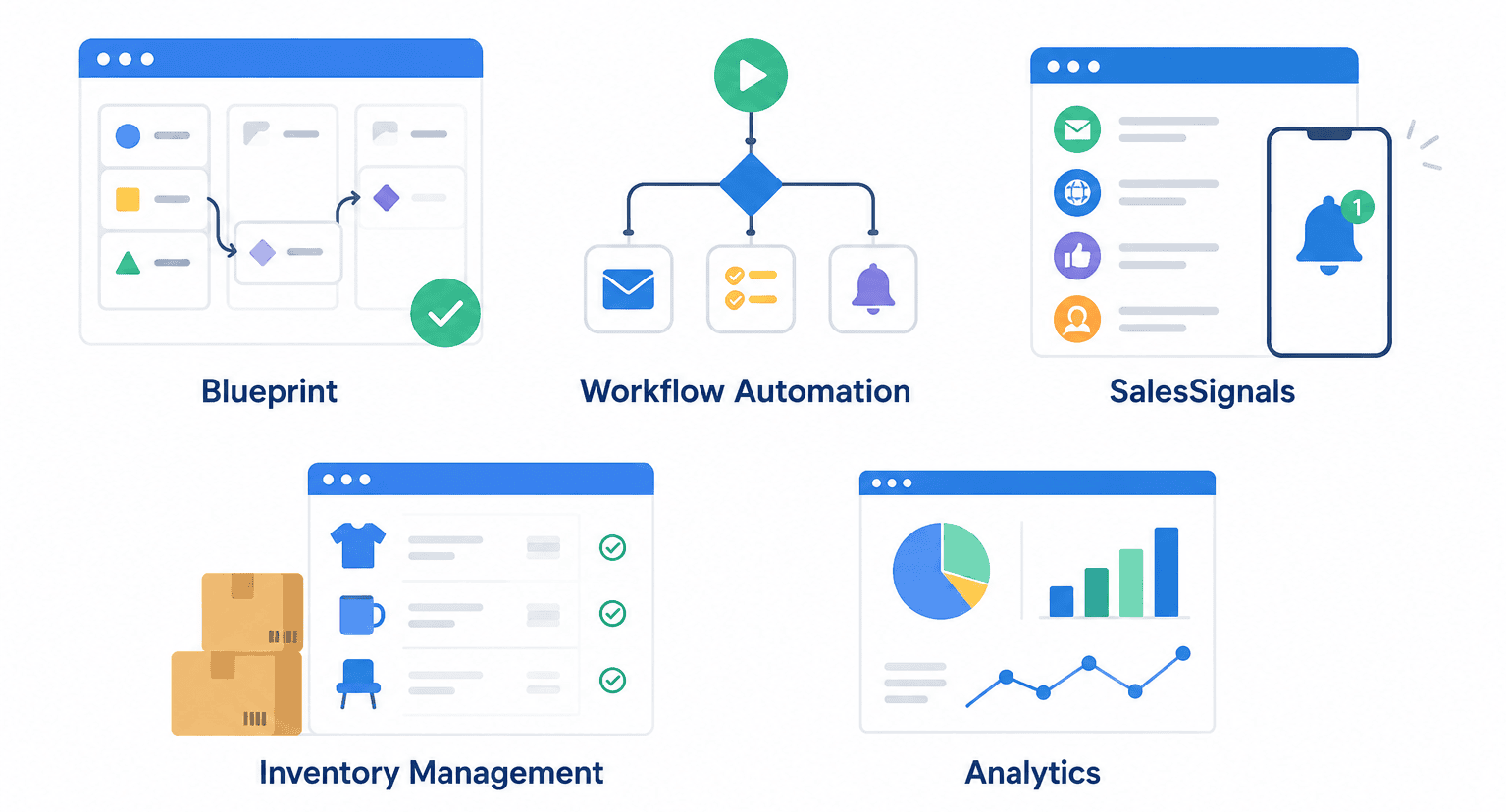
With the Professional plan, Zoho CRM to feel like a mature enterprise sales tool. For an additional $9 per user per month on top of the Standard plan, you gain access to a significantly more powerful platform.
Blueprint: Implementing Your Sales Process
Blueprint is one of the most underrated features in Zoho CRM . It allows you to define the exact stages your deals must go through, who can move a deal from one stage to another, what data must be entered before a stage change is permitted, and what actions are automatically triggered when a transition occurs. Think of it as a flowchart for your sales process—built right into your CRM.
Workflow Automation
The Professional plan offers significantly more powerful workflow automation than the Standard plan. You can create multi-condition workflows that trigger emails, update fields, create tasks, and notify team members based on deal activity, contact behavior, or time-based rules. This is where manual data entry begins to disappear from your daily routine.
SalesSignals
SalesSignals real-time notifications from every customer touchpoint—email opens, website visits, social media interactions, support tickets, and more—into a unified feed visible to your sales reps. This feature alone can significantly improve response times and the timing of follow-ups.
Inventory Management
The Professional plan includes a basic product catalog, price lists, quotes, sales orders, invoices, and purchase orders. For product-based businesses, this eliminates the need for a separate quoting tool and keeps your entire sales-to-invoice workflow within Zoho CRM.
Zoho CRM Plan: The Best Value Growing Businesses
Zia AI: Your Intelligent Sales Assistant
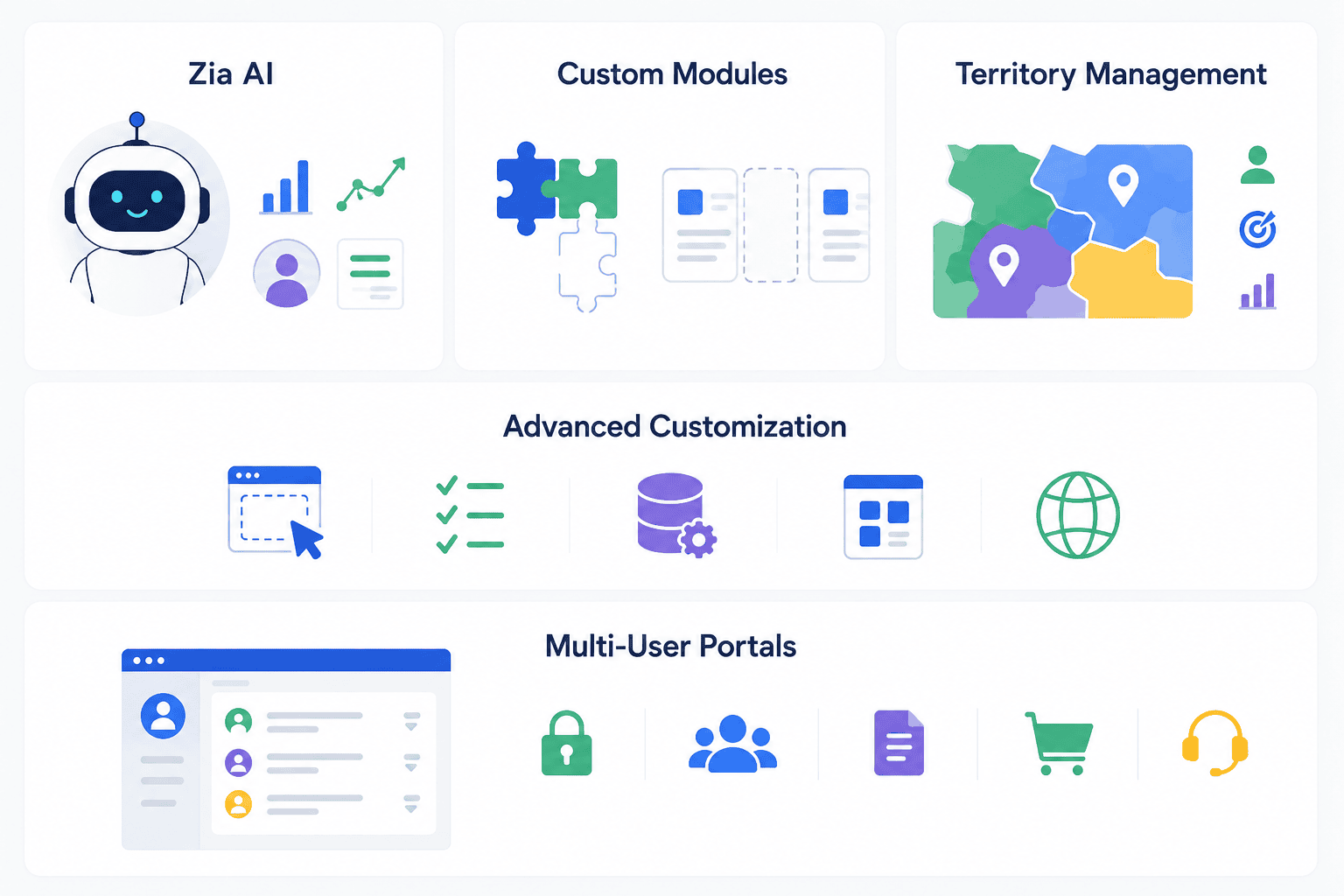
Zia Zoho's built-in AI , available at the Enterprise tier. Zia your sales data to predict deal close probabilities, identifies the best time to contact a lead, detects anomalies in your pipeline, automates data enrichment, and provides next-best-action recommendations to your sales reps. For businesses with a sufficient volume of CRM , Zia a genuine competitive advantage.
Custom Modules
Enterprise lets you build fully custom modules beyond the default Leads, Contacts, Accounts, and Deals. This is essential for businesses with unique data structures—such as consulting firms tracking project deliverables, real estate agencies tracking property listings, or manufacturers tracking service contracts. Custom modules are what transform Zoho CRM a generic sales tool into a purpose-built business platform.
Territory Management
For organizations with geographic or account-based sales territories, the Territory Management module in Enterprise allows you to assign accounts and opportunities to specific territories, set territory-level forecasts, and maintain clear rep accountability without complex manual assignments.
Advanced Customization
Canvas drag-and-drop CRM design for a fully customizable user interface
Validation rules to ensure data quality at the point of entry
Sandbox for testing configurations before deployment to production
Page layouts customized by profile, role, or record type
Multi-currency support for international sales teams
Multi-User Portals
Enterprise includes the ability to create customer and partner portals—providing external users with limited, controlled access to their CRM without requiring a full paid license. This is particularly valuable for B2B that want to give clients visibility into orders, project status, or support cases.
Zoho CRM Plan: Maximum Power and Analytics
The Ultimate plan adds advanced analytics, intelligence, and expanded platform capabilities on top of everything included in the Enterprise plan. It is designed for larger organizations where executive visibility, data-driven decision-making, and business intelligence reporting are strategic priorities.
Advanced Analytics Business Intelligence
Ultimate includes Zoho Analytics a bundled feature—a comprehensive business intelligence and reporting platform. This means your sales leadership can create executive dashboards, cross-functional reports, predictive forecasts, and board-level visualizations without having to export data to a separate tool. For companies that manage multiple departments using Zoho, this integration is particularly powerful.
Common Mistakes When Choosing a Zoho CRM
Choosing Based Solely on Price
The most costly CRM is choosing the cheapest plan that technically works today. A sales team that grows from 5 to 20 users within 18 months and then realizes it needs Blueprint, territory management, or Zia AI face a disruptive migration in the middle of its growth phase, on top of the challenges of scaling its team. Plan for where you’ll be in two years, not where you are today.
Ignoring Future Growth
The Standard and Professional plans may seem like the right choice for a 10-person team, but if you expect to double your headcount or expand into new markets, the Enterprise plan’s territory management and custom modules will save you a significant amount of time on reconfiguration down the line.
Underestimating the Need for Automation
Many buyers underestimate how much time their team spends on manual CRM , scheduling follow-ups, and routing leads. Even basic automation—such as automatically assigning leads, sending follow-up sequences, and notifying managers of stalled deals—can save each salesperson 30–60 minutes per day. That time savings alone often justifies upgrading to a higher-tier plan.
Advanced Overbuying Features
The opposite mistake also occurs. A five-person startup that signs up for Ultimate on the assumption that it will eventually outgrow it is paying for features and storage it won’t use for years. Be honest about where your organization stands today and choose a plan that matches your current level of process maturity—then upgrade when the time is right.
Ready to Get Started? Schedule a Free Zoho CRM
Not sure whether Standard, Professional, Enterprise, or Ultimate is right for your business?
CRMOZ help assess your needs, estimate the total cost of ownership, and recommend the Zoho CRM that best suits your sales process, budget, and growth plans.